What is workshop management software?
Workshop management software (also called a DMS or an automotive ERP) is built to manage a vehicle's whole journey through the workshop: appointment, check-in, quote, repair, invoice and handover. It works for a mechanical workshop as well as for a body shop, a tyre shop or a motorcycle workshop.
Unlike a spreadsheet, it connects each stage to the next so that no piece of data has to be typed twice:
A vehicle's journey, in one program
- AppointmentBy phone or online
- Check-inDetails and condition
- QuoteParts and labour
- ApprovalThe customer accepts
- Work orderJobs and mechanic
- InvoiceFrom the order data
- NotificationCar ready
When you search for the number plate, the software brings back the customer's details, the mileage at the last visit and the previous repairs, so nothing is typed twice.
Why digitise workshop management?
Many workshop owners resist the change thinking: "I've spent 20 years with my notebook and my Excel sheet and nothing has ever gone wrong". The cost of that calm is invisible, but it is there: time that leaks away every day and jobs that never make it onto an invoice.
Excel, paper and WhatsApp
- Appointments in notebooks. Customers turning up without a confirmed slot and cars sitting on a lift with no parts ready.
- Duplicate customers. The same customer entered three times, with different phone numbers, in scattered rows.
- Unbilled labour. Small diagnostics or extra time that nobody writes down and that never reach the invoice.
- Last-minute invoices. Done in a rush at month end, with a risk of mismatches, and you will have to check how they fit with Veri*factu in 2027.
Centralised management
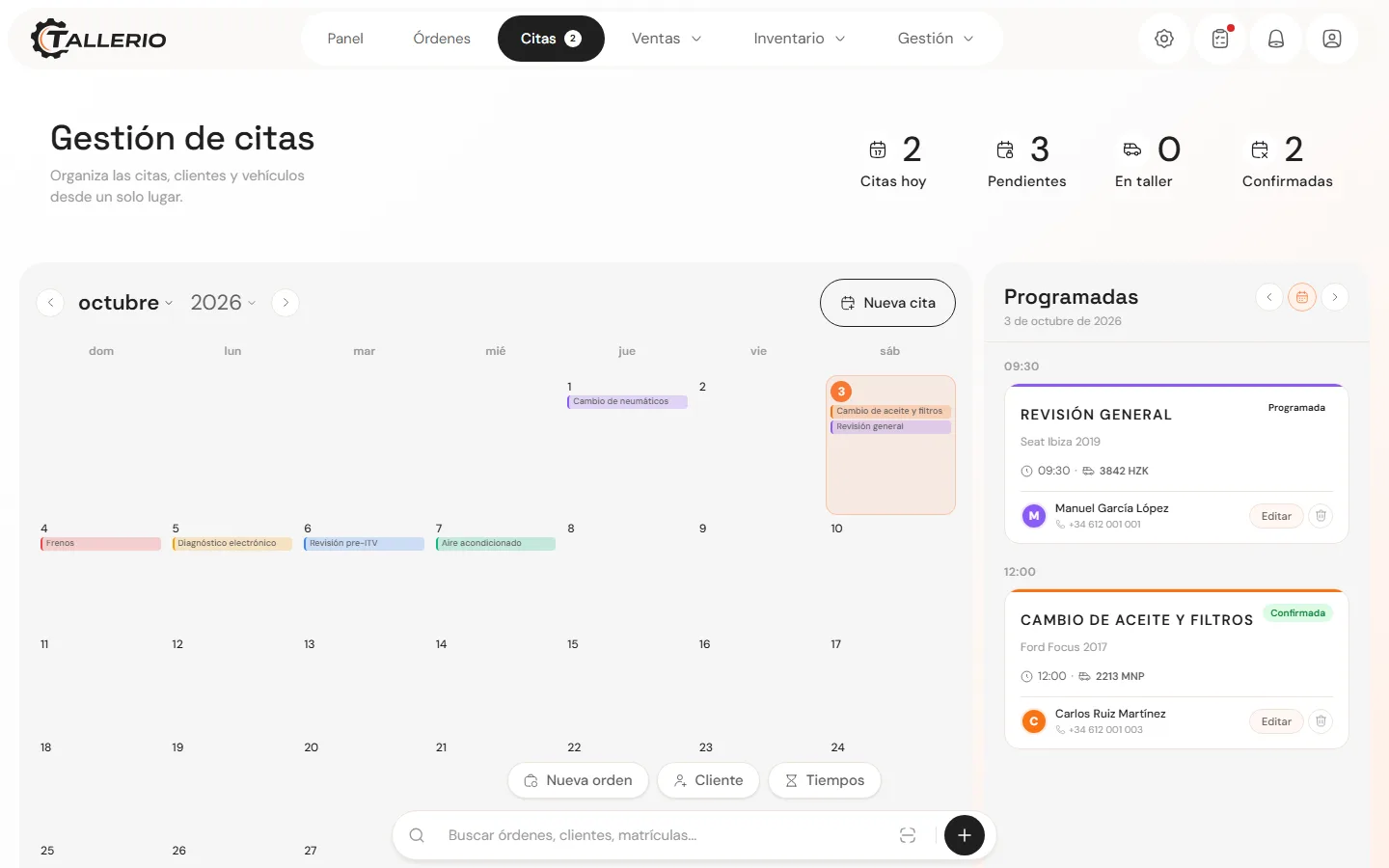
- Visual calendar. The week's workload at a glance, with every appointment tied to its customer and vehicle.
- One record per number plate. Visit history, mileage and the vehicle's documents in seconds.
- Assigned jobs. Each order shows what has to be done, which mechanic has it and what state it is in.
- Invoicing ready. The invoice comes out of the order, with no retyping, and with Veri*factu if the software includes it.
The 7 essential features your software must have
Not every program on the market fits the pace of a workshop. Some generic admin suites make you fill in dozens of fields that have nothing to do with the job. Good software should handle these seven areas well:
Customers and vehicles (one record)
The number plate is the backbone. The software should let you find the full history in seconds: mileage at each visit, previous faults, invoices issued and pending notes (for example, pads at 20% for the next visit).
Digital work orders
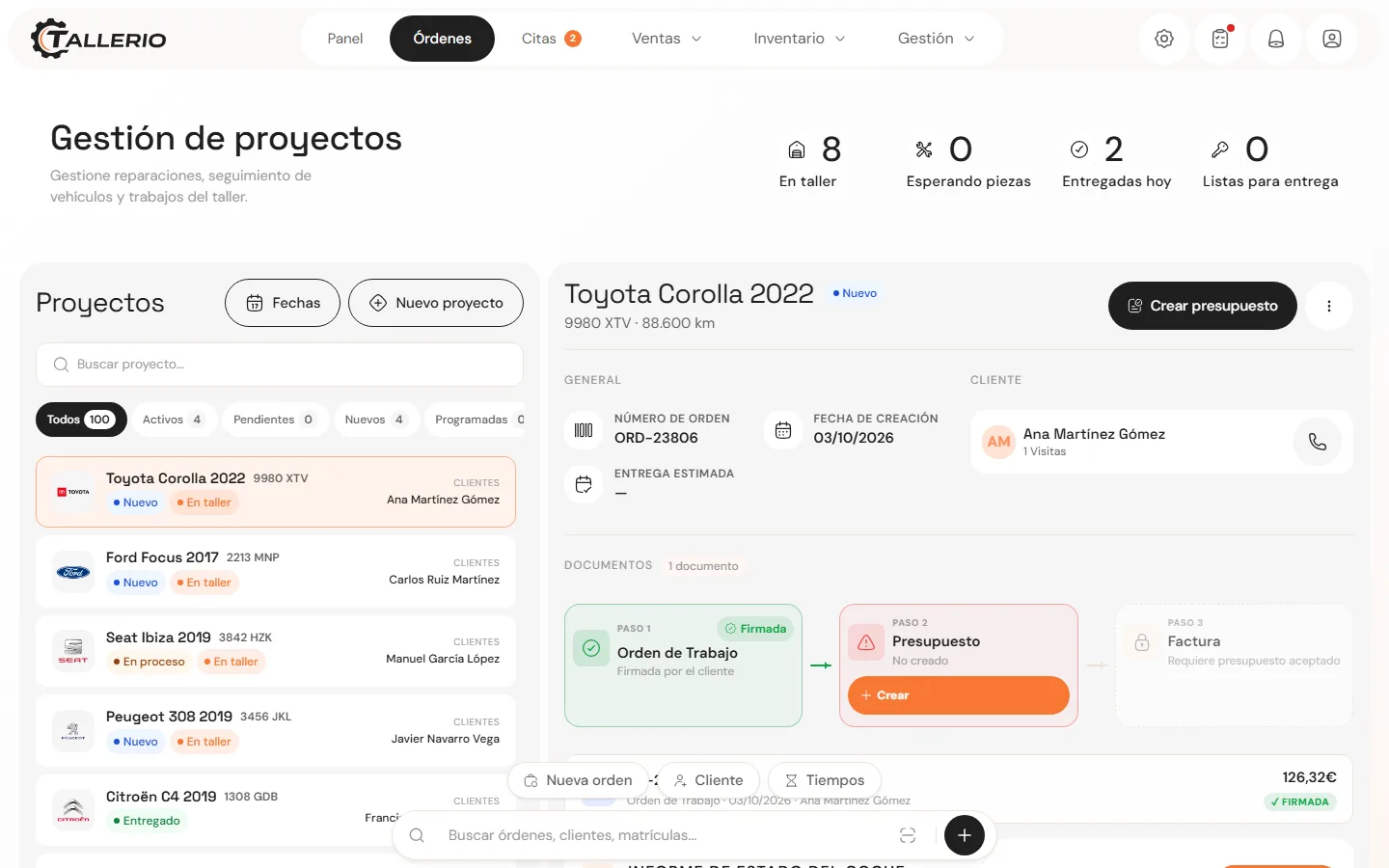
They replace the sheet of paper on the dashboard. Each order holds the jobs, the parts and the assigned mechanic, and can be opened from the front-desk computer, a tablet or a phone.
Quotes and customer approval
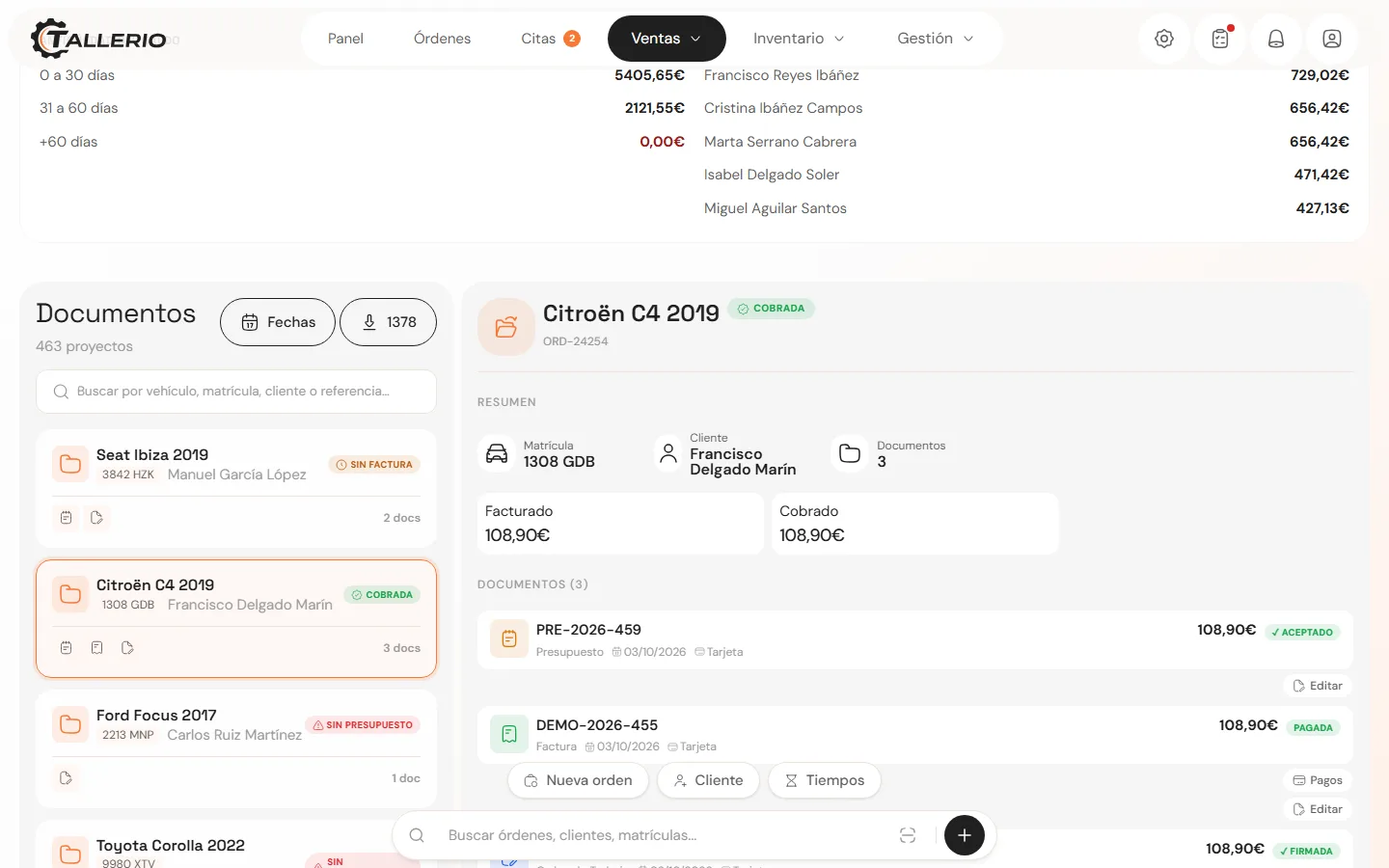
In Spain the customer is entitled to a written quote and, if they waive it, that waiver should be signed. Good software produces the quote, records the acceptance and turns it into a work order without copying anything by hand.
Invoicing and tax requirements (Veri*factu and TicketBAI)
The invoice should come out of the order, with parts and labour already filled in. The software also has to be adapted to Veri*factu (and to TicketBAI if you work in the Basque Country): chained records, a QR code and submission to the Spanish Tax Agency.
Veri*factu dates: 1 January 2027 for companies and 1 July 2027 for the self-employed. The deadlines have already moved once, so it is worth confirming them. We explain it in the Veri*factu guide for workshops.
Customer updates by WhatsApp
Phoning every customer when their car is ready interrupts the work again and again. Look for software that sends appointment confirmations, car-ready messages and inspection reminders from ready-made templates.
Visual calendar and online booking
A day or week view avoids bottlenecks on the lifts. As an extra, some programs let the customer book a slot themselves from a link.
Business analytics
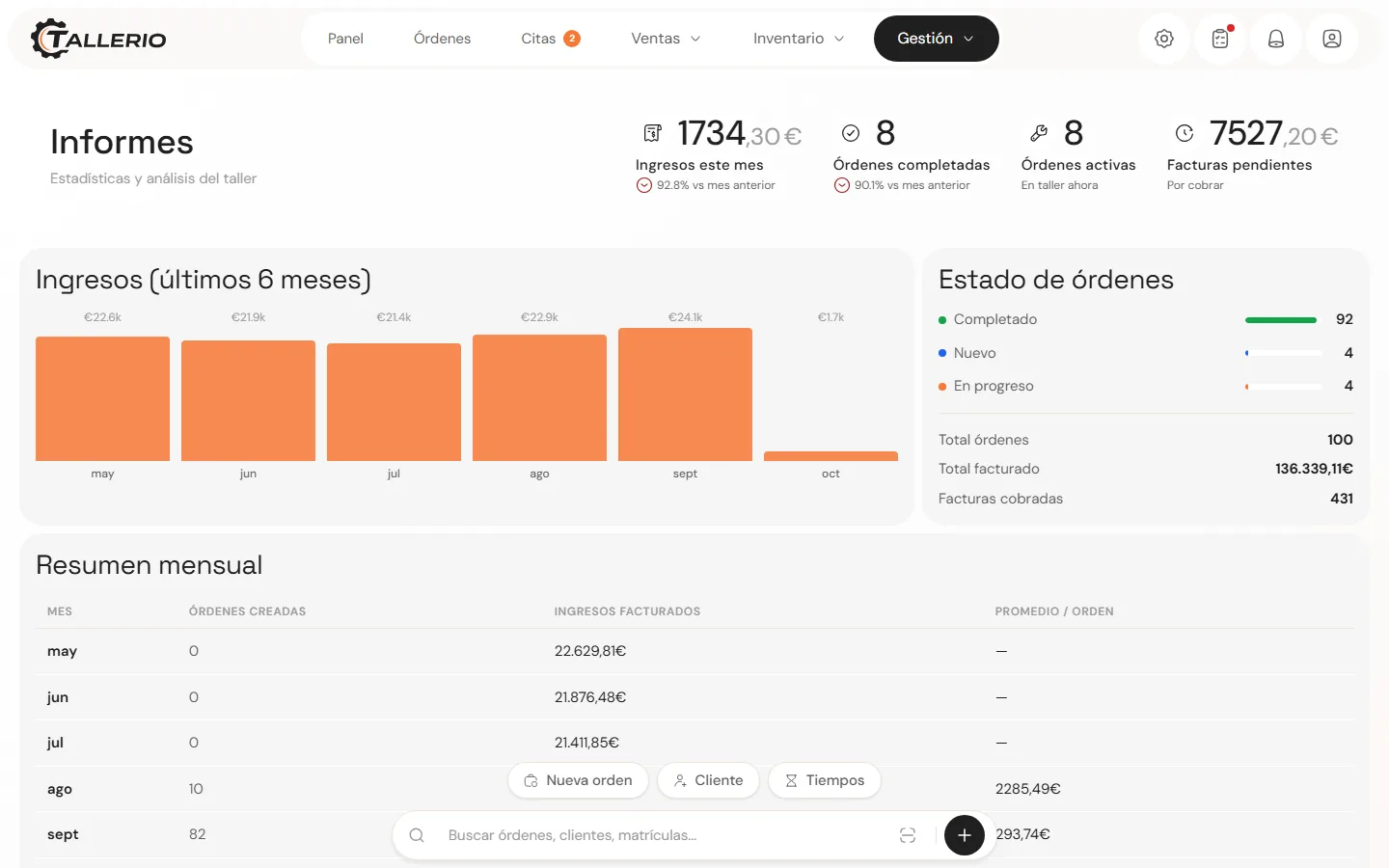
Revenue per month, completed orders, average ticket and unpaid invoices. Without this data, decisions are made by eye.
How much can workshop management software save?
The subscription is usually small next to the admin time it gives back. Do the sum with your own numbers:
Recovered time calculator
Move the sliders to estimate what that time is worth in your workshop.This is an estimate based on your own figures, not a guaranteed result. It leaves out other effects, such as jobs that stop going unbilled.
What a small or mid-sized workshop should look for
The needs of an independent workshop with two mechanics are very different from those of a multi-site dealership. If yours is independent, focus on these criteria so you don't pay for tools nobody will use:
Ease of use
Opening a work order should take a minute, with no courses and no 200-page manuals. If the team needs long training, it will go back to paper.
Cloud access
No server in the office, no backups on a USB stick, and available from a computer, a tablet or a phone.
Real workshop features
A generic invoicing program doesn't know what a VIN, a number plate or an inspection date is.
Tax compliance included
Ask which plan includes Veri*factu (and TicketBAI if you need it) and whether it costs extra.
Help with migration
Ideally you can import your customers and vehicles from a file, and the vendor lends a hand if the volume is large.
Transparent monthly price
Be wary of upfront licences, installation fees or charges for every user you add.
How to move from Excel to management software without stopping the workshop (a 7-step guide)
The biggest fear when changing system is losing days of work. Done in stages, the transition fits into a weekend or the quietest hours, without turning cars away:
- Step 1
Take stock of what you have
Find where everything lives: the customer spreadsheet, the invoicing sheets, the appointments notebook and the contacts on the front-desk phone.
- Step 2
Clean up duplicates
Merge entries like "Juan García", "J. García" and "Juan Seat" into a single record, with the right phone number and tax ID.
- Step 3
Decide what to keep
Don't carry over quotes that were turned down four years ago. Bring only active customers (for example, those with a visit in the last 24 months) and their vehicles.
- Step 4
Import customers and vehiclesHow it works in Tallerio
Save the sheet as CSV and import it. In Tallerio you do this from Customers, with a preview that shows which rows will go in before anything is created. And if you take a paid plan, the team can load the file for you at no cost.
- Step 5
Set up the new workflow
Add the workshop's logo and tax details, set the hourly labour rate and check the invoice numbering series.
- Step 6
Do a trial run with the team
Create one order together from start to finish: check-in, jobs, quote and invoice. Better with a real car and on a quiet day.
- Step 7
Review the first week
Check that no car leaves the workshop without its order closed and invoiced in the software. If something is still being written on paper, find out why.
If you want to go deeper into this part, we have a dedicated guide on how to leave Excel behind in a repair workshop.
What if I want to switch from older software?
Many workshops run software installed on one computer that hasn't been updated in years or that charges extra for every new feature. Before you sign with a new vendor, ask these questions:
Key questions for the vendor
- Can I export my customers and vehicles whenever I want, at no cost? The data belongs to your workshop. The software should let you download it as Excel or CSV at any time.
- Are Veri*factu and TicketBAI included or charged separately? Ask which plan includes them and whether future tax updates cost extra.
- Is there a minimum term or an installation fee? Avoid 12 or 24-month contracts that tie you to a tool that may not fit.
- How does support respond in the middle of the working day? Check which channel they use and how fast they answer, before you need it with a customer waiting.
Tallerio as an example of workshop management software
Tallerio is cloud software built for the day-to-day of a repair workshop: check-in, work order, quote, invoice and customer message in one flow. We use it as the example here because it is the one we know. Apply the same table to any other software you are considering.
What it does not do: no warehouse management or full accounting, and it is a young product without the track record of other options on this list.
Tallerio's published prices and terms
14-day free trial, no card: the team sets the workshop up in under 24 hours. If you subscribe afterwards, migrating your data from another program or from Excel is free. The detail is in the Tallerio plans.
Checklist table: what to demand from your software
| Criterion | What to check in the demo | In Tallerio |
|---|---|---|
| Customers and vehicles | Search by name, phone or number plate, and history per vehicle. | All plans |
| Work orders | How long it takes to open an order and assign it to a mechanic. | All plans |
| Quotes | That an accepted quote becomes an order and an invoice with no retyping. | All plans |
| Invoicing | Invoice created from the order, and a PDF with the workshop's details. | Unlimited invoices on all plans |
| Veri*factu and TicketBAI | Chained record, QR code and submission to the tax authority with no external tools. | Pro and Business plans |
| Calendar | An appointments view tied to customers and vehicles. | All plans. Online booking on Pro and Business |
| WhatsApp updates | Which messages go out on their own and which you send with one tap. | Depends on the plan |
| Reports | Revenue, orders and outstanding payments without exporting to Excel. | Pro and Business plans |
| Cloud access | That it works on computer, tablet and phone with nothing to install. | All plans |
| Migration from Excel | An importer for customers and vehicles, and help if the volume is large. | CSV importer. On a paid plan, the team migrates your data at no cost |
| Support | Which channel they use and how quickly they answer. | By email on all plans. Priority on Business |
| Price | No sign-up fee, no installation and no minimum term. | From €29/month |
Frequently asked questions about workshop management software
What is workshop management software?
It is software designed to centralise the management of a repair workshop, including customers, vehicles, appointments, quotes, work orders, invoicing and activity tracking.
What should software for a repair workshop include?
Software for a repair workshop should make it easy to manage customers and vehicles, work orders, quotes, invoicing, the calendar, customer communication and analysis of the workshop's activity.
How do you move from Excel to workshop management software?
The change can be made gradually: first you review and clean the Excel data, then you decide which information to migrate, you import the data and finally you bring the team into the new workflow.
Can a small workshop use management software?
Yes. A small workshop can use management software to centralise customers, vehicles, appointments, quotes, work orders and invoicing, as long as the solution fits the size and needs of the business.
Conclusion: the best software is the one that fits your workshop's daily work
Moving from a spreadsheet to specialised software isn't about making processes more complicated, but the opposite: taking the friction out of the admin tasks that eat up your evenings.
With service history, work orders and invoicing in one program you can open from any device, the team makes fewer mistakes, loses less time on paperwork and reaches Veri*factu with the homework done.
If you already have candidates on the table, go through the 7-point checklist for choosing software or the comparison of software for repair workshops.