Tallerio includes a clock-in screen designed to be left open on a tablet or computer in the workshop. Each employee registers their check-in and check-out with their password, and that data feeds the attendance tracking you see in Employees.
The clock-in screen
Open it at your workshop's /clock-in address. It shows the workshop name, a live clock and a card for each employee.
- The employee finds their name in Search employee… or locates it on the grid.
- They tap their card and enter their password.
- They tap Clock in. A confirmation message appears: Check-in recorded or Check-out recorded, as appropriate.
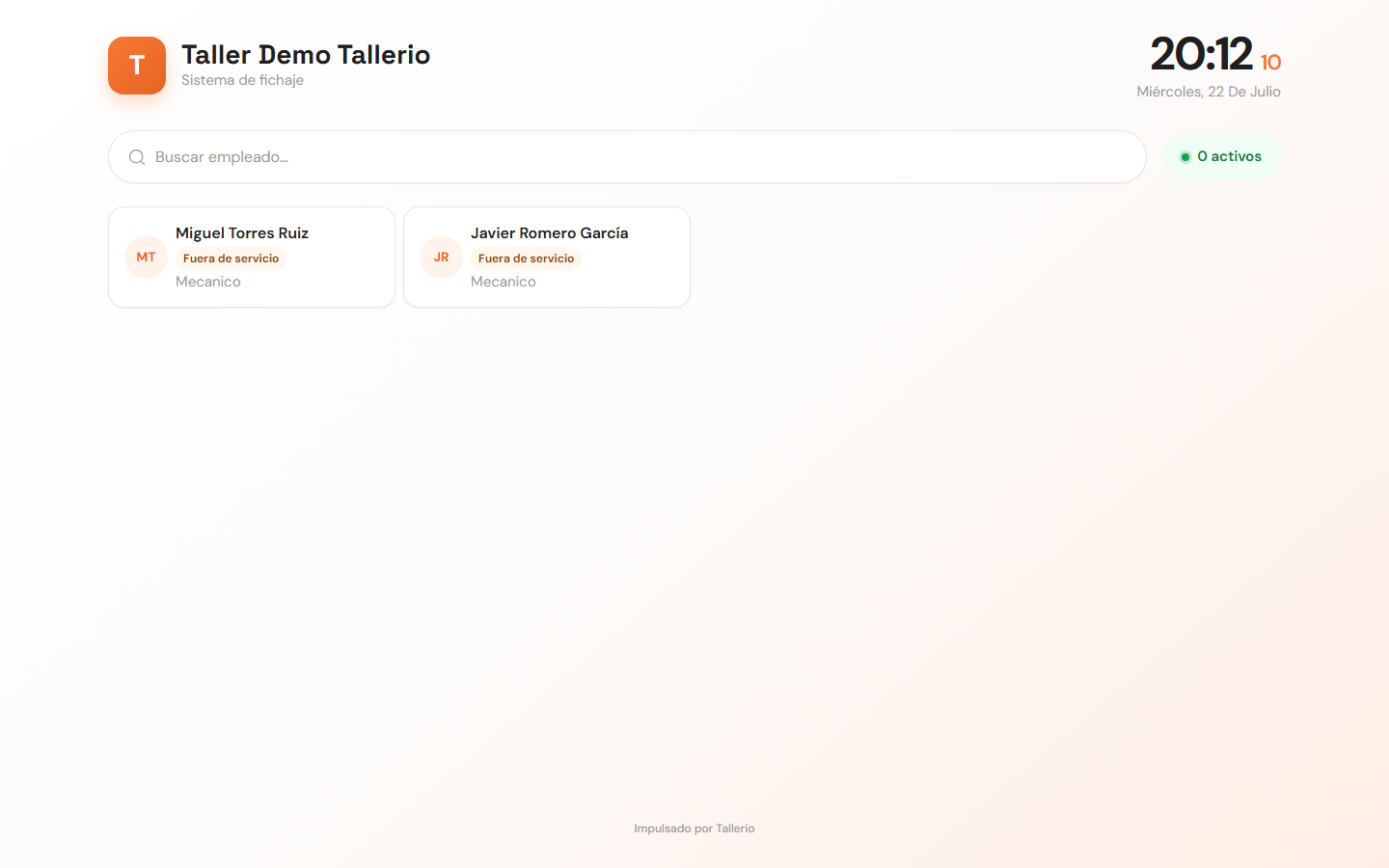
Each card shows whether the person is On shift or Off duty, and the number of active employees at that moment is shown at the top.
The administrator doesn't appear on the clock-in screen, and suspended employees are automatically hidden.
Attendance in Employees
In Employees, the status cards at the top summarize the team: Total team, On shift now, On break and Absent today. Each employee shows a status label (On shift, Break, Absent or Off).
Opening their profile, the Attendance tracking block shows the hours clocked today and this week. For a detailed record, use Generate report from the actions menu and choose Hours worked or Clock-in log (available on Pro plans).